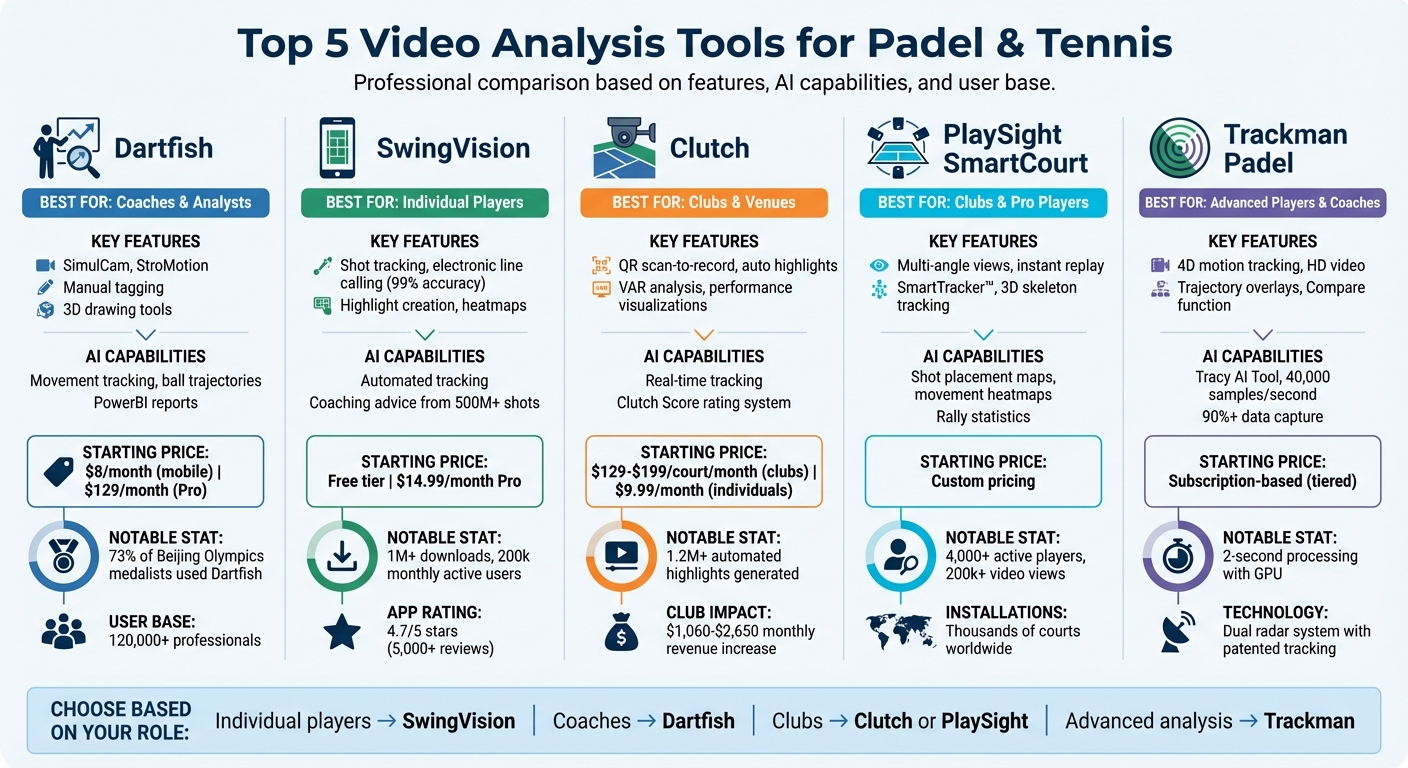
Video analysis has transformed how players and coaches improve their padel and tennis skills. From tracking shot placement to creating heatmaps and instant replays, these tools provide actionable insights for players of all levels. Here are the top five platforms leading the way:
- Dartfish: Offers advanced tools like SimulCam for performance comparisons and StroMotion for stroke analysis. Ideal for coaches with detailed manual tagging and interactive stats. Pricing starts at $8/month.
- SwingVision: Smartphone-based app that tracks stats like shot speed and rally length. Features electronic line calling and highlight creation. Free tier available; Pro subscription is $14.99/month.
- Clutch: Fixed-camera system designed for clubs. Automatically generates match highlights and tracks performance metrics. Club subscriptions range from $129 to $199 per court/month.
- PlaySight SmartCourt: Multi-angle camera setup for clubs and pro players. Provides instant replays, shot maps, and AI-driven insights. Custom pricing based on facility needs.
- Trackman Padel: Advanced radar technology for 4D motion tracking and AI-driven feedback. Subscription plans vary based on features and hardware integration.
Each tool caters to different needs - whether you're a player seeking self-improvement, a coach analyzing technique, or a club enhancing member experience.
Quick Comparison
| Tool | Best For | Key Features | Starting Price |
|---|---|---|---|
| Dartfish | Coaches | SimulCam, StroMotion, manual tagging | $8/month |
| SwingVision | Individual Players | Smartphone-based, shot tracking | Free; $14.99/month Pro |
| Clutch | Clubs | Fixed cameras, auto highlights | $129–$199/court/month |
| PlaySight SmartCourt | Clubs & Pro Players | Multi-angle, AI insights | Custom pricing |
| Trackman Padel | Advanced Players & Coaches | 4D motion analysis, radar tracking | Subscription-based |
These tools simplify training, improve performance tracking, and offer tailored solutions for players, coaches, and clubs.
Video Analysis Tools for Padel and Tennis: Features and Pricing Comparison
How to Analyze Your Padel Match Footage (And Actually Improve)
sbb-itb-5591e69
1. Dartfish
With over two decades of experience and a user base exceeding 120,000 professionals [3], Dartfish has established itself as a trusted name in sports video analysis. Its reputation soared when more than 73% of Olympic medalists at the Beijing Games incorporated Dartfish into their training [3]. For padel and tennis players, this platform delivers insights that match elite training standards.
Video Analysis Features
Dartfish's SimulCam technology is a standout feature, letting users overlay multiple performances into a single view. This makes it possible to compare serves or strokes over time, even when the camera angles differ. Another powerful tool, StroMotion, breaks down stroke phases into one frame, clearly illustrating the progression of a racket's path. Coaches can also benefit from 3D drawing tools and multi-video analysis, which allow them to review multiple performances side by side to pinpoint technical flaws. For on-the-go analysis, the myDartfish Express and Note apps let users capture footage directly on iOS and Android devices, tag key moments, and review plays immediately - no need to wait until you're back at a desktop.
AI Capabilities
Dartfish leverages AI to track player movements and ball trajectories, automatically generating PowerBI reports packed with actionable stats. The platform also integrates external data streams with video, transforming raw data into detailed visualizations that make it easier to spot performance trends and areas needing improvement.
Pricing and Accessibility
Dartfish’s pricing aligns with its professional-grade features. The myDartfish Pro plan costs $129/month (billed annually) and includes 50GB of cloud storage for seamless device syncing [4]. For those seeking a more affordable option, entry-level plans start at just $8/month for mobile-only access. On the higher end, the Pro S plan is available at $194/month, offering advanced features like live collaboration and full access to the SimulCam suite. If you're unsure about committing, a 15-day free trial provides a risk-free way to explore the platform.
"You can do the slow-mo, you can repeat, you can do a one on one, you can copy, you can compare. There are endless possibilities with this product." – USA Gymnastics women's national team coordinator Valeriy Lyukin [4].
Next, let’s dive into another tool reshaping the way athletes and coaches approach performance analysis.
2. SwingVision
SwingVision transforms your smartphone into a professional-grade tool for tennis video analysis. With over 1 million downloads and a monthly active user base of 200,000, it has become the official player and ball tracking app for Tennis Australia, the LTA, and the ITA [6]. Former World No. 1 Andy Roddick sums it up perfectly: "SwingVision is the first solution to bring sports intelligence to any court in the world, using just your smartphone" [7].
Video Analysis Features
SwingVision uses a single camera angle to automatically track key stats like shot speed, placement, depth, and rally length. After your session, you can filter footage based on stroke type - forehand, slice, serve, or return - or review highlights like your longest rallies or toughest points [5]. The app’s electronic line calling (ELC) delivers real-time calls with 99% accuracy overall and 97% on close calls within 10cm [6]. You can even challenge calls directly from your Apple Watch and review them in slow motion.
Additional features include shot placement and movement heatmaps, which provide a clear picture of your court coverage. To top it off, the app trims downtime between points, creating highlight reels that are ready to share on social media [7].
AI Capabilities
The AI behind SwingVision is powered by data from over 500 million shots taken by 200,000 players [6]. This allows the app to offer tailored coaching advice by analyzing your performance trends. You can also set weekly goals to track your progress. Professional coach Steve Whelan highlights its impact: "The power of video and advanced AI tennis analytics removes the guesswork from coaching" [9].
For optimal use, mount your device on a fence behind the baseline using a "Swing Stick" instead of a tripod, and position the camera with the sun behind you [8].
Pricing and Accessibility
SwingVision has a free tier offering 8 hours of HD recording per month, making it a great option for casual players [10]. For those seeking more advanced features, the Pro subscription costs $14.99 per month or $179.99 annually. This unlocks perks like automated scoring, electronic line calling, and unlimited cloud storage. You can also test the full functionality with a 30-day free trial [9]. The app boasts a 4.7/5 rating on the App Store from over 5,000 reviews [7]. Currently supporting tennis and pickleball, the app plans to add padel soon [6].
Hardware/Software Integration
For real-time stats and line calling, an iPhone or iPad with an A13 chip or newer (like the iPhone 11 or later) is required. Devices with an A12 chip can still process video, but only after the session ends [8]. SwingVision also integrates seamlessly with Apple Watch Series 6 or newer, letting you control recordings, track scores, and receive haptic feedback for line calls - all from your wrist [8]. This level of integration paves the way for even more advancements in video analysis.
3. Clutch
Clutch stands out by offering fixed-camera solutions tailored for clubs and facilities, eliminating the need for players to rely on their personal devices. Currently, the system is in use at over 60 premium clubs across more than 30 countries and has generated over 1.2 million automated highlights [11]. Its scan-to-record workflow simplifies the experience - players just scan a QR code on the court, and the Clutch Cam automatically records their match. Unlike mobile-based solutions, Clutch's fixed-camera setup is specifically designed for seamless use in club environments.
Video Analysis Features
Clutch automatically identifies rallies and generates shareable highlight clips right after your match. Through the mobile app, players can create custom analytics clips and access VAR (Video Assistant Referee) point analysis, which provides frame-by-frame breakdowns of disputed points [12]. Additionally, the platform offers performance visualizations, including shot patterns, court positioning, and distance covered during matches [11].
AI Capabilities
Clutch's AI processes matches in real time, tracking every player movement and shot as they happen [11]. This data powers the Clutch Score, a dynamic rating system that updates after each match based on performance, rather than tournament results. Scores like 8.94 or 8.71 reflect real-time player performance [11]. During the Alfred Dunhill Padel Classic at London's Hurlingham Club, Clutch-generated highlights garnered over 1 million views on social media, showcasing its appeal and reach [11].
"The cameras are easy to use, our members love watching themselves play, and sharing highlights has been great for engagement and visibility" – Pedro Zorraquin, VP Growth at Bay Padel in San Francisco [11].
Pricing and Accessibility
For individual players, Clutch Pro is available at $9.99 per month or $79.00 annually [12]. Single 60-minute recordings with AI analysis can also be purchased for $3.99 each [12]. The app has an impressive 5.0/5 rating on the Apple App Store, though some users have noted occasional login issues [12]. Clubs operate on a subscription model, with the Clutch Cam hardware included for free with annual plans. Installation is quick, taking under 30 minutes, and clubs often see monthly revenue increases between $1,060 and $2,650 due to higher court bookings and player engagement [11]. This pricing structure accommodates both individual players and club managers.
Hardware/Software Integration
Clutch combines its physical Clutch Cam with a mobile app for players and a web-based Club Dashboard for facility managers. The dashboard enables club owners to oversee court usage, track player engagement, and manage content for social media or sponsorships [11]. For example, Ultra Padel in Miami uses the system across 25 courts, while The Pad in Sarasota has installed "Clutch TV" screens, allowing players to view their AI-generated highlights as soon as they leave the court [11]. While the fixed-camera setup relies on club installations, it offers a hassle-free alternative to personal device usage, making it ideal for organized facilities.
4. PlaySight SmartCourt
PlaySight SmartCourt transforms sports facilities into modern, tech-enabled venues with its multi-angle camera setup. This system has been installed on thousands of padel and tennis courts worldwide, alongside pickleball facilities. It's trusted by major professional and collegiate organizations, including the NBA, MLB, NHL, and NCAA. Leading padel venues like Reserve Padel and Padel Haus also rely on this technology for high-quality video analysis [13].
Video Analysis Features
PlaySight's system offers synchronized multi-angle views and instant replay, allowing users to tag plays and highlight key moments. Its AI-powered SmartTracker™ technology automatically tracks on-court action, while the TagMe feature creates shareable highlights for social media. Additionally, the system includes 3D skeleton tracking for advanced movement analysis [13].
"We love being able to capture 5 angles at the same time to help teach our players and breakdown film. I highly recommend using PlaySight as a coaching and player development tool."
- Bruce Pearl, Head Men's Basketball Coach, Auburn University [13]
Beyond capturing visuals, the platform uses AI to deliver performance insights.
AI Capabilities
PlaySight's AI processes gameplay footage into detailed performance metrics. Shot placement maps indicate where every ball lands, while movement heatmaps reveal court coverage patterns. The system also provides rally statistics, breaking down shot speed and match momentum. During the Mountain West Conference championships, Associate Commissioner Brian Tripp managed 24 cameras simultaneously to enhance analysis and coverage. To date, the platform supports over 4,000 active players and has generated more than 200,000 video views [1].
Pricing and Accessibility
PlaySight offers a custom pricing structure, ensuring facilities get tailored solutions for their training needs. Pricing details are available directly from their sales team. The system is available in two formats: a Fixed Solution for permanent installations with cabled infrastructure, and a Portable Solution (PlaySight GO) for venues without a pre-existing network. Individual players can access features like TagMe and on-demand match viewing through partner facilities via the PlaySight Sports Network [13].
Hardware and Software Integration
Teams like the Boston Celtics have adopted PlaySight to streamline video recording during practice, eliminating the need for handheld cameras. This allows video coordinators, such as Matt Reynolds, to focus more on drills. The system integrates camera hardware with cloud-based software, automatically recording sessions and processing data for instant insights through the Svila platform. Sessions can be started effortlessly with a QR code scan. By 2026, over 15 partner clubs are expected to operate more than 30 smart courts [1].
5. Trackman Padel
Trackman Padel takes performance feedback to the next level with its advanced radar and AI-driven technology. Using patented radar tracking, it delivers precise 4D silhouette analysis. The dual radar system operates at an impressive 40,000 samples per second per receiver, providing highly accurate 4D tracking and capturing over 90% of data across various shot types [17]. Originally designed for golf, Trackman has fine-tuned its technology to meet the needs of padel and tennis players.
Video Analysis Features
This system records every movement with high-definition video, offering instant replays and graphic trajectory overlays. Coaches can use the Compare function to view movements side-by-side, while the AI Motion Analysis feature automatically identifies body joints and equipment positions. It also pinpoints key movement phases (P1 through P9), enabling users to jump directly to critical moments like the takeaway or follow-through [15].
AI Capabilities
Trackman's Tracy AI Tool processes real-time data to highlight inefficiencies and provide objective, data-supported feedback [16]. The AI enhances analysis by generating instant visual overlays - such as lines and circles that track player motion - without requiring manual input [15]. For optimal performance, a compatible Nvidia GPU with at least 6GB of VRAM can process each shot in just 2 seconds, compared to approximately 15 seconds on a CPU [14][15].
"This isn't just about cool visuals - it's about giving you more time to teach, more clarity to communicate, and more confidence in your analysis." - Trackman [15]
Pricing and Accessibility
To access features like AI Motion Analysis V2, users need an active software subscription, which is available in tiers such as TM4, TMiO Home Complete, or TMiO Commercial [15]. Pricing does not include VAT, sales tax, import duties, or other government fees [18]. The system supports a variety of camera setups, including iPhones (via the Trackman Camera app), IDS industrial cameras, and standard USB cameras. For best results with AI analysis, cameras should record at a minimum of 120fps [15].
Hardware and Software Integration
Trackman Padel offers seamless hardware and software integration to ensure a unified experience. The Trackman Performance Studio (TPS) software, version 10.1 or later, acts as the central hub for shot analysis and data tracking [15][17]. With its AI-calibrated multi-camera setup, the system automatically aligns 3D overlays with video footage. For mobile setups, the Trackman Camera app on iPhone works flawlessly - just enable the "Fast Shutter" setting for optimal results [15]. System requirements include 16GB of RAM, 7.5GB of free storage, and a compatible Nvidia GPU for real-time processing [14].
Feature and Price Comparison
Here's a streamlined comparison of features and pricing to help you decide based on your budget, technical needs, and role - whether you're a player, coach, or club owner.
If you're looking for premium tools, PlaySight SmartCourt stands out with its fully automated AI capabilities, including match recording, auto-generated highlights, and performance insights. Coaches might prefer Dartfish, which provides robust manual analysis tools like on-video drawing and interactive stats. For players who want AI insights without investing at a club level, SwingVision offers a smartphone-based solution that balances convenience and functionality. Club owners can explore Clutch, which operates on a subscription model ($129–$199 per court per month on annual plans) and includes a free $399 camera, potentially increasing monthly revenues by $800–$2,000 [11]. For advanced athletes and coaches, Trackman Padel provides cutting-edge motion analysis through subscription plans tailored to specific needs.
Each tool has its strengths. PlaySight simplifies the process with no need for additional apps [1], while SwingVision leverages your smartphone for easy, on-the-go capture. Dartfish focuses on manual tagging and detailed video analysis, while Trackman Padel delivers advanced motion tracking for those serious about performance metrics.
For professional features like shot placement maps, heatmaps, and rally analysis, platforms like PlaySight SmartCourt are worth considering. Here's a quick comparison of the tools:
| Tool | Target Audience | AI Capabilities | Pricing Model | Key Strength |
|---|---|---|---|---|
| Dartfish | Coaches & Analysts | Manual tagging and interactive stats | Premium subscription | In-depth manual analysis with on-video drawing tools |
| SwingVision | Individual Players | Automated tracking | Mid-range subscription | Smartphone-based convenience |
| Clutch | Clubs & Venues | Automated highlight generation | $129–$199 per court/month | Boosts player engagement and revenue generation [11] |
| PlaySight SmartCourt | Clubs & Pro Players | Fully automated AI analysis | Club-level investment | QR-start recording and seamless performance tracking [1] |
| Trackman Padel | Advanced Players & Coaches | Advanced motion analysis | Subscription-based | Sophisticated motion tracking for detailed reviews |
This table highlights the tools' distinct features, making it easier to pick the one that fits your requirements.
Conclusion
Video analysis has reshaped how players and coaches approach padel and tennis training by providing clear, objective insights. Whether you're refining technical skills like footwork and swing mechanics or analyzing tactical decisions such as shot selection under pressure, video offers a perspective that speeds up improvement. This detailed feedback helps you pick the right tools to meet your training goals.
The range of tools available caters to different needs. For individuals, smartphone apps like SwingVision are a practical choice. Coaches might prefer manual tagging tools like Dartfish, while clubs can benefit from automated systems like Clutch or PlaySight. Beyond immediate feedback, recording sessions over time creates a valuable archive. This archive can track progress through visuals like heatmaps, shot statistics, and fitness data, providing a comprehensive view of development over time [19][20].
"Video shows the problem. Coaching shows the solution." - eTennisNet [2]
Deciding on the right tool starts with identifying your main focus - whether it's self-improvement, working with a coach, or enhancing club training - and aligning it with your budget and objectives.
FAQs
Which video tool is best for me: player, coach, or club?
The right tool really depends on what you're looking to achieve.
- Players might find Wingfield’s AI cameras incredibly useful. These cameras automatically generate highlights and come with advanced training tools to sharpen skills.
- Coaches could lean towards iSportsAnalysis, which provides detailed video analysis, interactive stats, and instant replays - ideal for breaking down gameplay.
- Clubs may benefit from Svila AI, which upgrades court technology by providing match recordings, highlights, and performance insights, making court management more efficient.
What equipment do I need to get accurate tracking and replays?
To get precise tracking and replays, you'll need a smartphone or camera, a tripod or stand, and careful placement. Position the camera at net height and angle it diagonally toward the court for optimal coverage.
How do I choose between smartphone apps and fixed court cameras?
When deciding between smartphone apps and fixed court cameras, it really comes down to what you’re looking for. Smartphone apps are super convenient - easy to set up and perfect for quick feedback. Many even offer features like high frame rates, which are great for breaking down your technique.
On the other hand, fixed court cameras deliver professional-quality footage. With their stable, consistent angles, they’re ideal for more detailed analysis and long-term reviews. If you’re a casual player, apps might be all you need. But if you’re serious about training, fixed cameras could be the better choice.